





Skip to content

Visual timer

In beta

A visual timer the whole family can see: the LEAVE IN countdown

FamilyOrganization.app is the family organizer on the TV you already own, with an ADHD-friendly visual timeline for each person (Roku now; Apple TV, Fire TV and Google TV coming).

Its LEAVE IN countdown is an ADHD visual timer for the whole family: before each appointment the TV shows GET READY and TRAVEL blocks, then counts down to the minute you need to walk out the door.

See how it works

Updated · Feature status checked September 28, 2026

A TV on the living-room wall above a wooden mantel, showing FamilyOrganization.app.
LEAVE IN 07:01 before soccer practice (demo family). Try it: hover over or tap a person on the TV to see their day, then click or tap again to open their task list. Demo: the banner counts down LEAVE IN 07:01, 07:00, 06:59 while a red NOW line moves toward the GET READY and TRAVEL blocks before soccer practice at 4:00 PM.

Short answer

What is an ADHD timer?

An ADHD timer shows time running out as a shrinking shape or bar instead of numbers, so the time left is something you can see.

The best-known example is Time Timer, a physical timer with a colored disk that disappears as the minutes pass (timetimer.com). Families use visual timers for homework, transitions and getting out the door.

FamilyOrganization.app puts that idea on the family TV and ties it to the calendar. Before each appointment the TV shows a GET READY block sized to that person's own get-ready time, a TRAVEL TIME block and a LEAVE IN countdown. The countdown shows the current time and the time left together, so nobody has to do the math at the door.

It is ADHD-friendly by design: a tool that helps make time visible, not a treatment.
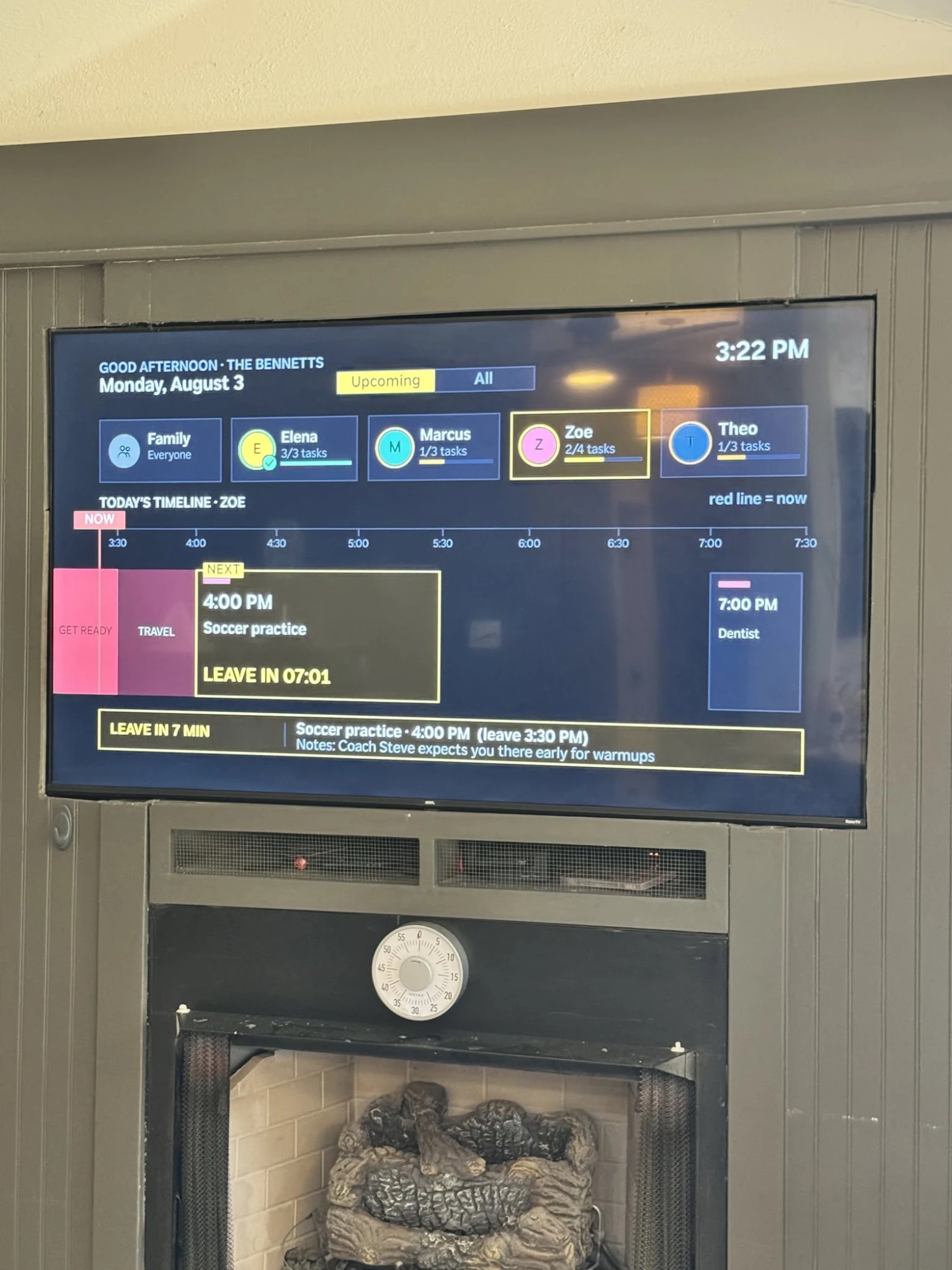
A real wall-mounted TV above a fireplace running an early FamilyOrganization.app beta build. Zoe's timeline shows a GET READY block and a TRAVEL block before soccer practice at 4:00 PM, and the banner reads LEAVE IN 07:01.
A real TV in a real living room: an early beta build on August 3, 2026, with demo data. Colors have changed since.

How it works

How does the LEAVE IN countdown work?

The TV works backwards from each appointment: event start, minus travel time, minus that person's get-ready time.

  1. Step 1: Set each person's get-ready time

    In the iPhone app, give everyone their own prep time. A slow starter can have 25 minutes while a teen has 10. If you skip it, the household default of 10 minutes is used.

  2. Step 2: Add the event, and your home address if you like

    Events come from the calendars on your iPhone. With a home address set, travel time is recalculated from live driving times every 30 minutes, and the TV flags a traffic change of 5 minutes or more.

  3. Step 3: The TV counts down and chimes

    The GET READY block turns from green to yellow, orange and red as time runs out. The banner counts down LEAVE IN, and chimes you choose play at get-ready, leave and start times.

What the banner says

  1. LEAVE IN 7 MIN

    Time left before you need to walk out the door.

  2. GO NOW

    It's time to leave.

  3. HAPPENING NOW

    The event has started.

Brief Wi-Fi drops don't blank the screen: the day keeps counting down. The countdown sits on the family timeline, next to everyone else's day. Pair it with the morning routine before you leave, so the steps and the countdown share one screen.

Optional live traffic

What time should we leave?

Leave at the start time minus the drive, and start getting ready one get-ready time before that. With travel time turned on, FamilyOrganization.app does this math on the TV for each person and keeps it up to date with traffic.

Travel time is optional. It stays off until you add a home address and turn it on in the iPhone app. Then, every 30 minutes, it asks Google for the live driving time from home to each event with an address in the next seven days, and it checks again within two hours of the start.

The TV draws a TRAVEL TIME block before the event and moves the leave time to match. If the drive changes by 5 minutes or more, the TV says so for five minutes, as TRAFFIC UP or TRAFFIC DOWN with the new drive and the new leave time. It covers driving only, not transit, walking or cycling.

Can Google Maps tell you what time to leave? For one trip on one phone, yes: look up the directions with an arrive-by time. The TV does it for every event with an address, for the whole family at once.

Visual timers for ADHD

What kinds of visual timers are there for ADHD?

Visual timers for ADHD come in five common kinds: disappearing-disk timers, Pomodoro timers, transition warnings, routine timers and leave countdowns.

Each one makes a different kind of time visible. A disappearing-disk timer shows how long is left on one task. A Pomodoro timer splits work into focus blocks and breaks. A transition warning gives a heads-up before a change, like play to dinner. A routine timer paces the steps of a morning or bedtime.

A leave countdown is different: it times the whole run-up to an appointment, including getting ready and the drive, and it is tied to the calendar, so nobody has to set it. That is the kind FamilyOrganization.app shows on the TV. Many families use more than one kind, for example a desk timer for homework and the TV countdown for school pickup.

Types of visual timers and what each is best for
FeatureHow it worksBest forOften suits
Disappearing-disk timerA physical or on-screen dialA colored disk shrinks as the minutes passOne task: homework, tidying, screen timeYoung children and up
Pomodoro timerWork for a set block, then take a short breakFocus on longer workOlder kids, teens and adults
Transition warningA heads-up a few minutes before a changeMoving from play to dinner or bathKids who find stopping hard
Routine timerA short time for each step of a routineMornings and bedtimesKids building independence
TV leave countdownFamilyOrganization.appGET READY and TRAVEL blocks, then LEAVE IN on the TVGetting everyone out the door on timeThe whole family at once

Short answer

What is the best visual timer for ADHD?

The best visual timer for ADHD is the one that fits the job: a desk timer for one task, and a calendar-linked countdown for leaving the house.

For a single task, a disappearing-disk timer such as Time Timer is simple, needs no setup and works anywhere. It times one thing you set by hand.

For getting out the door, the hard part isn't one task. It is the whole run-up: stopping what you're doing, getting ready, and the drive. A desk timer doesn't know when soccer starts or how long each child takes to find their shoes. The TV countdown does: it reads the family calendar, sizes a GET READY block to each person, adds travel time and counts down to the minute you need to leave, on a screen everyone can see.

If you already love your desk timer, keep it for homework. The two do different jobs.

A desk visual timer and the TV countdown compared
FeatureTV LEAVE IN countdownFamilyOrganization.appDesk visual timerFor example, Time Timer
What it timesEvery appointment on the family calendarOne task you set by hand
Knows each person's get-ready timeYes, per personNo
Includes travel timeYes, optionally from live driving timesNo
Who can see itEveryone in the room with the TVWhoever is next to it
Needs a TVYes: Roku today, more TVs comingNo: it works anywhere

Short answer

Do visual timers help ADHD?

Many families find they do: a visual timer turns time into something you can see, which is the part many people with ADHD find hardest.

A clock only tells you the time. A visual timer shows how much is left and how fast it is going, without mental math. That is why they are a common suggestion for transitions, homework and leaving the house.

We are careful here. We don't point to a single study proving that a TV countdown helps, and we don't claim it treats or fixes anything. For research and practical guidance on ADHD and time, start with CHADD, ADDA and Understood.

What we can share is what families told us after seeing the countdown on Facebook in September 2026: several singled out the countdown and the get-ready blocks. Their words are below, verbatim. See more on the ADHD-friendly family calendar page.

An honest note

What if a countdown feels like pressure?

For some kids, including many with a PDA profile, a countdown can feel like a demand, so every sound on the TV is optional.

No chimes play until you add them, you choose which moments get one, and quiet hours keep the TV silent at night. There is no separate low-demand mode yet. If your child finds the countdown stressful, tell us in the beta: that is how we decide what to build next.

Families said

What did families say about the countdown?

The LEAVE IN countdown was one of the most talked-about parts of the TV when it was shared on Facebook in September 2026.

“I need count downs, I have terrible time blindness.”

Ashley M. · Facebook · Sep 2026

“I love the “get ready” and travel time blocks.”

Morgan R. · Facebook · Sep 2026

“Love that it tells you the time you have to leave! So helpful!”

Kristen B. · Facebook · Sep 2026

Comments are quoted verbatim. Read more from the community.

Where it works

Where does the countdown work?

On Roku TVs and in the iPhone app, both in beta. Apple TV, Fire TV, Google TV and Android are coming soon.

On your TV

  • RokuCountdown, blocks and chimesIn beta
  • Apple TVComing soon
  • Fire TVComing soon
  • Google TVComing soon

On your phone

  • iPhoneLeave-by card and settingsIn beta
  • Android phonesComing soon

FAQ

Questions about the countdown

Does the countdown need a phone?

No one has to hold a phone: the countdown and the chimes run on the TV.

Read the full answer: Does the countdown need a phone?

A parent sets things up in the iPhone app, which also shows a leave-by card on its Today screen. Phone notifications aren't built yet, so the TV's chimes are the alert today.

Can I turn off the chimes?

Yes.

Read the full answer: Can I turn off the chimes?

No chimes play until you add them, and you choose which moments get one: get-ready, leave or start time. Quiet hours keep the TV silent at night, and you can record your own 10-second sound.

Does it work if the Wi-Fi drops?

Yes, for brief drops.

Read the full answer: Does it work if the Wi-Fi drops?

After the first load the TV keeps the day on screen and keeps counting down, then catches up when the connection returns. It needs a connection to start.

Does travel time use live traffic?

It can.

Read the full answer: Does travel time use live traffic?

Add your home address and turn travel time on, and driving times to each event are rechecked every 30 minutes. If the drive changes by 5 minutes or more, the TV says so and moves the leave time. It is off by default and covers driving only.

How much does it cost?

Pricing will be announced at launch.

Read the full answer: How much does it cost?

There is no hardware to buy, because it runs on a TV you already own.

Know when to leave, without watching the clock.

The LEAVE IN countdown is in beta on Roku and iPhone now.

  • No new screen to buy
  • Chimes only if you want them